FigyTerm — the open-source Fig alternative
The terminal with autocomplete superpowers.
IDE-level completions for git, docker, npm and more — then a code editor, an API client, a Claude Code window and a drawing board, each one shortcut away. Free, open source, and it never phones home.
curl -fsSL https://raw.githubusercontent.com/code4mk/figyterm/main/install.sh | shmacOS one-liner · Linux & Windows · No account, ever · MIT licensed
 zsh+
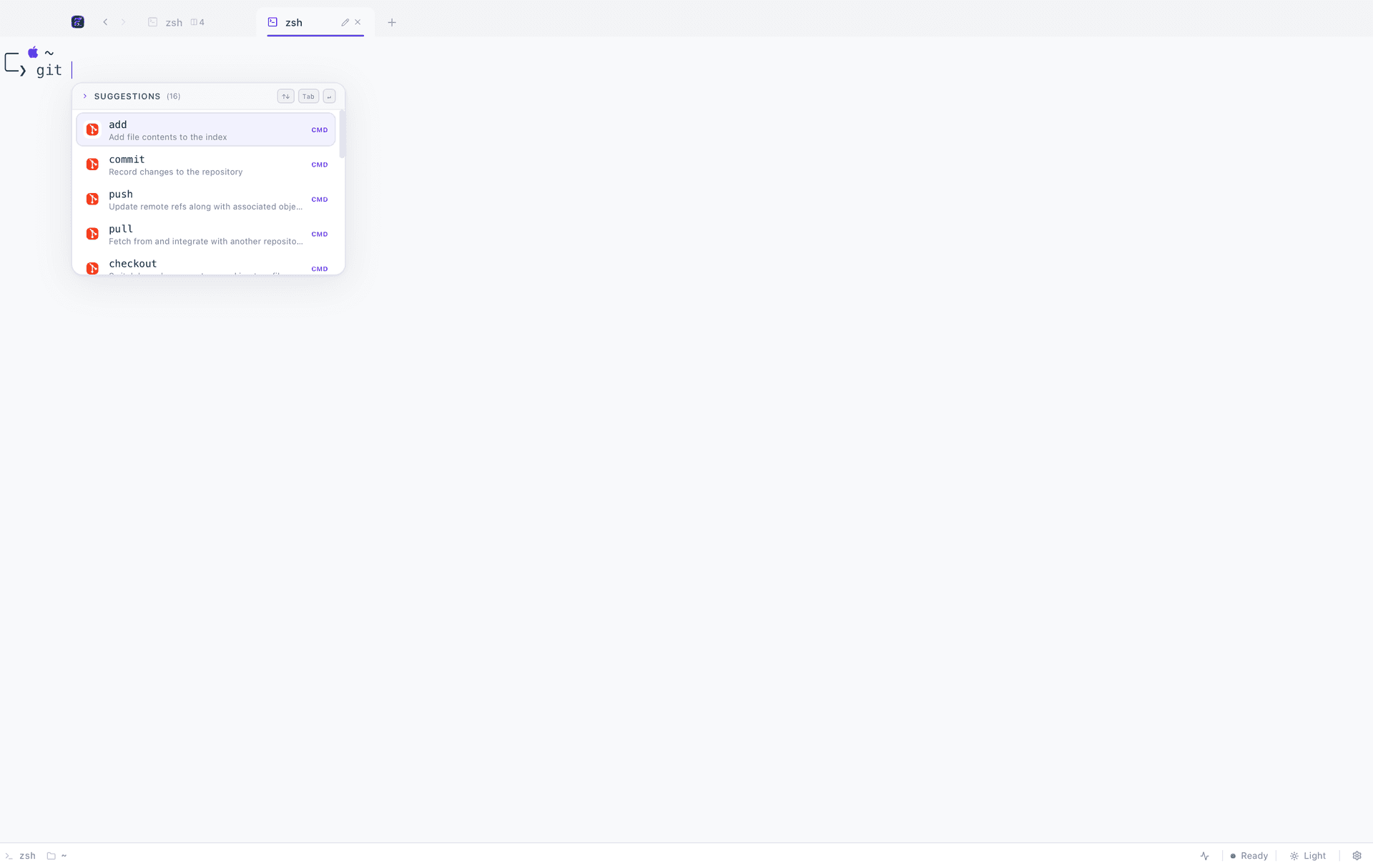
zsh+ pullFetch from and integrate with another repositoryCMD
- pushUpdate remote refs along with associated objectsCMD
- commitRecord changes to the repositoryCMD
- checkoutSwitch branches or restore working tree filesCMD
- Local — nothing leaves your machine
- 100%Local — nothing leaves your machine
- Tools in one window
- 6Tools in one window
- Trackers, accounts or sign-ups
- 0Trackers, accounts or sign-ups
- Platforms — macOS, Linux, Windows
- 3Platforms — macOS, Linux, Windows
Local by default
Completions, indexes, history and collections are computed and kept on your machine. No accounts, no telemetry, no analytics — the only request FigyTerm makes on its own is an update check against GitHub Releases.
Native, not a web app
A Tauri 2 shell with a real PTY behind it. Input has no perceptible latency, memory stays measured in tens of megabytes, and every heavy panel loads the first time you open it — never at launch.
Open source, forever
MIT licensed and developed in public, design notes and all. Read the code that runs your shell, file an issue, or ship a completion spec for your own CLI in a single pull request.
Features
Nine tools, one window, no tab-switching
Autocomplete is the headline. The rest of the workbench — an editor with git and language servers, a REST client, a Claude Code window, a drawing board and a browser — is behind one shortcut each, and none of it loads until you open it.
Intelligent autocomplete
Context-aware suggestions the moment you start typing, for git, docker, npm, pnpm, yarn, uv and more. Fig's spec format is read unchanged, so the community catalogue carries straight over.
Read moreThe terminal underneath
A Rust PTY backend behind xterm.js rendering: up to four panes per tab, drag-to-reorder tabs, fuzzy history search, live CPU and memory charts, and a command palette that spells every shortcut for the platform you are on.
Read more- ⌘ ⇧ E
Embedded code editor
Click a path in terminal output and the file opens at that line. Saves are atomic, conflicts are detected rather than silently lost, and line endings survive untouched.
Read more Git in the editor
Changed files badged in the tree, changed lines marked in the gutter, and a GitHub Desktop-style panel: tick the files, write a summary, commit. It runs your own git, so your hooks and credential helper apply.
Read more- Opt-in
Language servers
Opt-in LSP support in the editor. Nothing is bundled and nothing is downloaded: FigyTerm speaks to the servers you already have, and a session that never opens a file never starts one.
Read more - New⌘ ⇧ A
Claude Code window
The `claude` CLI exactly as it ships, in a child window FigyTerm draws the frame around. Projects are a primary folder plus any extras, and every conversation keeps running while you work elsewhere.
Read more - New⌘ ⇧ H
FigyMan, the API client
Requests are sent from Rust, not the webview, so the headers, redirect chains and timings are real. Collections and history live in SQLite on your machine, and the industry-standard interchange format round-trips losslessly.
Read more - New⌘ ⇧ X
Drawing projects
Sketch the architecture you are about to build without leaving the terminal. A project is a canvas and its notes together — both autosave, both are searchable, and there is no Save button to forget.
Read more - ⌘ ⇧ B
Embedded browser
Documentation lives one shortcut away instead of one window away. Because it is a genuine child webview rather than an embedded frame, sites that refuse to be framed load normally.
Read more
Screenshots
See it before you install it
Real captures from the app — no mockups, no marketing renders. Taken on macOS; the same features ship on Linux and Windows.
Suggestions that understand the command
Type git and FigyTerm knows the subcommands, their descriptions and your branches. Tab accepts, arrows navigate, Esc dismisses.
How autocomplete worksAutocomplete · 1 of 8
FigyTerm vs Fig
The Fig alternative that outlived Fig
Fig was acquired by AWS and its standalone autocomplete was retired, taking a much-loved workflow with it. FigyTerm rebuilds that experience as a full terminal — spec-compatible, offline, open source, and on all three platforms rather than one.
- Platforms
- macOS, Linux, WindowsmacOS only
- Autocomplete
- ActiveDiscontinued
- Account
- NeverRequired
- Offline
- AlwaysNo
Privacy
Local is not a feature here, it's the architecture
There is no server to opt out of. Everything the app computes, it computes on your machine.
No telemetry, no analytics
Nothing measures you. There is no event pipeline to opt out of, because there is no event pipeline.
No account, ever
Nothing to sign up for and nothing to sign in to. The app has no concept of a user.
Offline by design
Completions, indexes, history and collections are computed and stored locally. The one request the app makes on its own is an update check.
Auditable
MIT licensed, with the design notes for every major panel committed alongside the code.
Install
Running in under a minute
One command on macOS, one on Linux, one installer on Windows. You install once — FigyTerm updates itself from then on.
curl -fsSL https://raw.githubusercontent.com/code4mk/figyterm/main/install.sh | shFAQ
Questions people actually ask
The short list. The rest — platform quirks, package formats, the editor's save guarantees — is on the FAQ page.
What is FigyTerm?
FigyTerm is a free, open-source terminal for macOS, Linux and Windows that brings IDE-level autocomplete to the command line — and then the rest of the workbench: a code editor with git and language servers, a REST API client, a Claude Code window, a drawing board and an embedded browser. It is built with Tauri 2, Rust and React, and runs entirely on your machine.
Is FigyTerm the same as Fig or figterm?
No — they are three different things with confusingly similar names. FigyTerm is an independent, MIT-licensed terminal emulator by code4mk, built with Tauri 2, Rust and React, and unaffiliated with Fig or Amazon Web Services. Fig (withfig, fig.io) was a separate product, acquired by AWS in 2023 and sunset on 1 September 2024. figterm was Fig's shell integration shim, a component of that product. FigyTerm is a successor in spirit rather than a fork: the one real connection is that it reads the same completion spec format Fig used.
What happened to Fig, and what replaced it?
AWS acquired Fig in 2023. The standalone autocomplete app was sunset on 1 September 2024 and its capabilities were folded into Amazon Q Developer CLI. That left people who wanted a small, local, account-free autocomplete without one, which is the gap FigyTerm was built for — it reads the same spec format, so the community completions written for Fig still work.
Is FigyTerm a good Fig alternative?
Yes. Fig was acquired by AWS and its standalone autocomplete was discontinued, leaving a gap FigyTerm fills. FigyTerm reads the same spec format Fig used, so community command completions work here, and it does it without an account, a login or a network connection — on macOS, Linux and Windows rather than macOS alone.
Does FigyTerm send my commands anywhere?
No. There is no telemetry, no analytics and no account system. Autocomplete is computed locally by the Rust backend, so your commands, paths and history never leave your machine. The only network request the app makes on its own is checking GitHub Releases for an update.
Give your terminal its whole workbench
Free, MIT licensed, and entirely local. On macOS one command does it; Linux and Windows are one download away.
curl -fsSL https://raw.githubusercontent.com/code4mk/figyterm/main/install.sh | sh